



TP-Link TL-WN823N 300Mbps Mini Wireless N USB Adapter
TP-Link TL-WN823N 300Mbps Mini Wireless N USB Adapter The TP-Link TL-WN823N 300Mbps Mini Wireless N USB Adapter is a compact USB Wi-Fi adapter designed to add wireless connectivity to compatible desktop computers and laptops. It supports 2.4GHz IEEE 802.11b/g/n Wi-Fi...
Delivery: Nairobi same-day to 1 day; nationwide 1–5 business days.
Warranty: Manufacturer warranty where applicable.
Description
TP-Link TL-WN823N 300Mbps Mini Wireless N USB Adapter
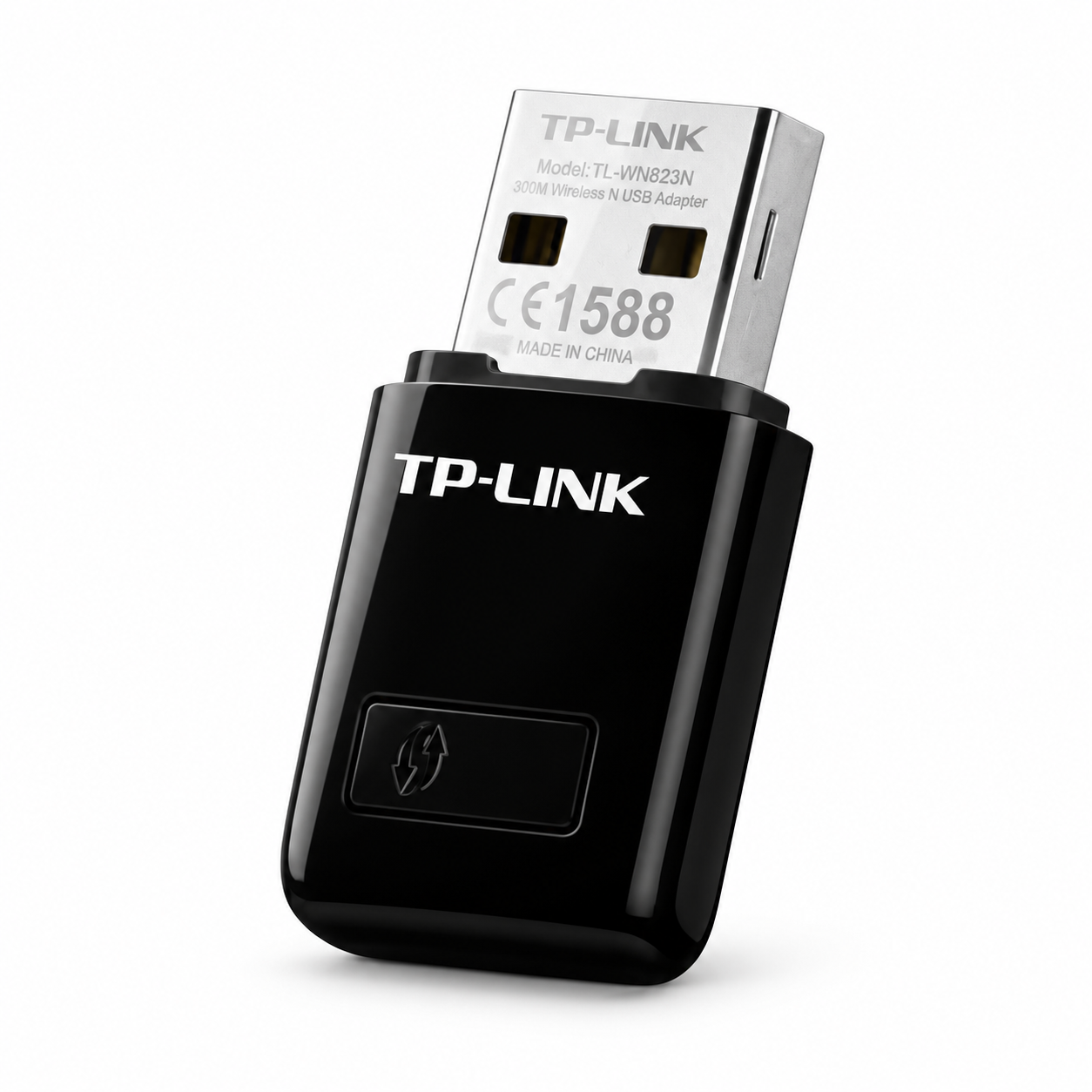
The TP-Link TL-WN823N 300Mbps Mini Wireless N USB Adapter is a compact USB Wi-Fi adapter designed to add wireless connectivity to compatible desktop computers and laptops. It supports 2.4GHz IEEE 802.11b/g/n Wi-Fi and offers wireless link rates of up to 300Mbps under suitable network conditions.
The TL-WN823N is a practical choice for users whose desktop PC does not have built-in Wi-Fi, whose laptop wireless adapter has stopped working, or who simply need a small external Wi-Fi adapter for everyday internet access. Its compact size makes it easy to leave connected to a USB port without the bulk of a larger adapter with an external antenna.
For buyers looking to buy the TP-Link TL-WN823N in Kenya, this model is best suited to straightforward 2.4GHz Wi-Fi connectivity for browsing, email, online work, streaming and general home or office use. It is important to note that the TL-WN823N is a single-band Wireless N adapter and does not provide 5GHz Wi-Fi.
Key Features of TP-Link TL-WN823N
-
Supports IEEE 802.11b, 802.11g and 802.11n
-
Operates on the 2.4GHz Wi-Fi band
-
Wireless link rate of up to 300Mbps
-
USB 2.0 interface
-
Compact mini design
-
Approximate dimensions of 39 × 18.35 × 7.87 mm
-
Built-in internal antenna
-
WPS button for supported wireless setup
-
Designed for laptops and desktop computers
-
Compatible with different operating systems depending on hardware revision and driver availability
-
Multiple hardware revisions have been released by TP-Link
Up to 300Mbps Wireless N Connectivity
The TP-Link TL-WN823N uses 802.11n Wireless N technology and supports a maximum advertised wireless link rate of up to 300Mbps.
This makes it suitable for common internet activities including:
-
Web browsing
-
Email
-
Online office applications
-
Video streaming
-
Voice applications
-
General home and office internet access
The 300Mbps figure is a theoretical wireless connection rate and should not be interpreted as guaranteed internet throughput. Actual speeds depend on the wireless router, broadband connection, distance, interference, building materials and other network conditions.
If your internet connection is slower than the adapter's wireless capability, your internet package will normally remain the limiting factor.
2.4GHz Wi-Fi Connectivity
The TP-Link TL-WN823N operates on the 2.4GHz frequency band.
This makes it compatible with a wide range of existing home routers, office access points and wireless networks using 802.11b/g/n technology.
The 2.4GHz band remains useful where good compatibility and relatively broad signal penetration are more important than accessing modern high-speed 5GHz channels.
However, buyers should understand that the TL-WN823N does not support 5GHz Wi-Fi. If your router is configured as a 5GHz-only wireless network, this adapter is not the appropriate choice.
If the router broadcasts both 2.4GHz and 5GHz networks, the TL-WN823N connects through the compatible 2.4GHz network.
Compact Mini Design
One of the strongest practical advantages of the TL-WN823N is its compact size.
TP-Link specifies dimensions of approximately:
39 × 18.35 × 7.87 mm
This small design allows the adapter to occupy a USB port without having a large body protruding from the computer.
It can therefore be convenient for laptops, desktop computers and compact workstations where space around USB ports matters.
Its size also makes it easy to carry as a backup wireless adapter for technicians, office users or anyone who regularly works with multiple computers.
USB 2.0 Interface
The TP-Link TL-WN823N connects to a computer using a USB 2.0 interface.
For many compatible computers, installation involves connecting the adapter to an available USB port and installing the appropriate driver where necessary.
Because TP-Link has released several hardware versions of the TL-WN823N, buyers should check the exact hardware revision before downloading drivers.
A driver intended for one revision should not automatically be assumed to support every other TL-WN823N version.
Internal Antenna
The TL-WN823N uses an internal antenna, helping TP-Link maintain the adapter's compact size.
This makes it convenient for normal home and office connections where the wireless router or access point is within a reasonable usable range.
The compact internal-antenna design should not, however, be confused with a dedicated high-gain USB Wi-Fi adapter.
If you need connectivity across very long distances, several thick walls or unusually weak-signal locations, an adapter with a larger external antenna may be more appropriate.
WPS Support
The TP-Link TL-WN823N includes a WPS button.
When used with a compatible wireless router or access point, WPS can simplify the connection process.
Whether WPS is available and enabled depends on the network equipment and its configuration. Normal Wi-Fi password-based setup can also be used where appropriate.
Wireless Security
TP-Link documentation for the TL-WN823N hardware family lists support for established wireless security standards.
Exact supported security options may depend on the hardware revision, operating system and driver being used.
For that reason, businesses or users with specific wireless-security requirements should confirm compatibility with the exact revision supplied before purchasing.
This is particularly important where the adapter is being deployed into a controlled business environment rather than a standard home network.
Hardware Revisions Matter
The TP-Link TL-WN823N has been released in multiple hardware revisions.
TP-Link's support pages currently show revisions including V1, V2, V3, V4 and newer V4-series sub-revisions in some regions.
This matters because driver availability and operating-system compatibility are not necessarily identical across all versions.
For example, TP-Link's current support resources for certain V4 versions include drivers for:
-
Windows 10
-
Windows 11
-
Selected older Windows versions
-
Selected macOS releases
-
Selected Linux environments
However, customers should not interpret this as universal support for every operating-system version on every TL-WN823N revision.
Before purchasing for a particular computer, confirm the exact hardware version and check TP-Link's support information for that revision.
TP-Link TL-WN823N Specifications
| Specification | Details |
|---|---|
| Product | TP-Link TL-WN823N |
| Product Type | USB Wireless Adapter |
| Wireless Standard | IEEE 802.11b/g/n |
| Wi-Fi Band | 2.4GHz |
| Maximum Advertised Link Rate | Up to 300Mbps |
| Interface | USB 2.0 |
| Antenna | Internal |
| WPS Button | Yes |
| Dimensions | Approx. 39 × 18.35 × 7.87 mm |
| 5GHz Support | No |
| Wi-Fi 5 Support | No |
| Wi-Fi 6 Support | No |
Driver and operating-system support should be checked against the exact hardware revision being purchased.
Best Uses for TP-Link TL-WN823N
The TP-Link TL-WN823N is most useful as a simple USB Wi-Fi solution for computers that need 2.4GHz Wireless N connectivity.
Typical applications include:
-
Adding Wi-Fi to a desktop computer without built-in wireless networking
-
Replacing a malfunctioning laptop Wi-Fi adapter
-
Connecting an older compatible computer to a 2.4GHz network
-
Providing a backup Wi-Fi adapter for troubleshooting
-
Home internet access
-
Office internet access
-
Remote work
-
Email and cloud applications
-
Web browsing
-
General video streaming
-
Everyday wireless networking
It is especially suitable where compact size and ease of use matter more than modern dual-band performance.
Who Should Buy the TP-Link TL-WN823N?
The TP-Link TL-WN823N is suitable for users who need an affordable and compact way to connect a compatible desktop or laptop to a 2.4GHz Wi-Fi network.
Desktop users can benefit if the computer was supplied without an internal wireless card. Instead of installing an internal PCIe Wi-Fi adapter, a USB wireless adapter can provide a simpler external solution.
Laptop users may find it useful as a backup adapter or as an alternative when an internal wireless interface has failed.
Businesses can also keep small USB Wi-Fi adapters available for temporary workstation connectivity and basic network troubleshooting.
For larger business networking projects involving routers, access points, structured cabling or network design, professional network planning may be more appropriate than relying on individual USB adapters. Businesses requiring such infrastructure can consult OrbitLink Solutions for enterprise and commercial networking services.
Who Should Consider a Different Adapter?
The TL-WN823N is not intended for every wireless requirement.
Consider a different adapter if you specifically require:
-
5GHz Wi-Fi
-
Dual-band wireless connectivity
-
Wi-Fi 5
-
Wi-Fi 6
-
Very high throughput
-
Long-range directional connectivity
-
A large external antenna
-
Enterprise-grade wireless hardware
-
Wireless connectivity for equipment that cannot use a standard USB network adapter
Choosing according to the intended application will usually produce better results than buying solely based on the advertised maximum speed.
What to Check Before Buying
Before ordering the TP-Link TL-WN823N in Kenya, check several practical details.
Confirm the Hardware Revision
Ask which TL-WN823N hardware revision is being supplied when operating-system compatibility matters.
TP-Link has manufactured several versions of the same model, and software support can vary.
Check Your Operating System
Verify that TP-Link provides a suitable driver for your computer's operating system and the exact adapter revision.
This is particularly important for Linux and macOS users.
Confirm You Need 2.4GHz
The TL-WN823N is a 2.4GHz adapter.
It does not provide 5GHz Wi-Fi access.
Check Available USB Ports
The adapter requires an available compatible USB connection.
Consider Your Signal Conditions
The compact internal antenna is designed for convenience rather than specialised long-distance wireless applications.
If the computer is far from the router or separated by several difficult obstacles, consider whether a larger external-antenna adapter would be better suited.
Understanding the 300Mbps Rating
The phrase 300Mbps in the TL-WN823N product name refers to its maximum advertised Wireless N link rate under suitable conditions.
It does not mean every customer will receive a 300Mbps internet connection.
Actual throughput can be reduced by:
-
Distance from the router
-
Walls and building materials
-
Wireless interference
-
Other 2.4GHz networks
-
Router capabilities
-
Internet-service speed
-
Computer performance
-
Network congestion
For example, connecting the TL-WN823N to a 50Mbps internet package does not convert that package into a 300Mbps internet connection.
The adapter sim