



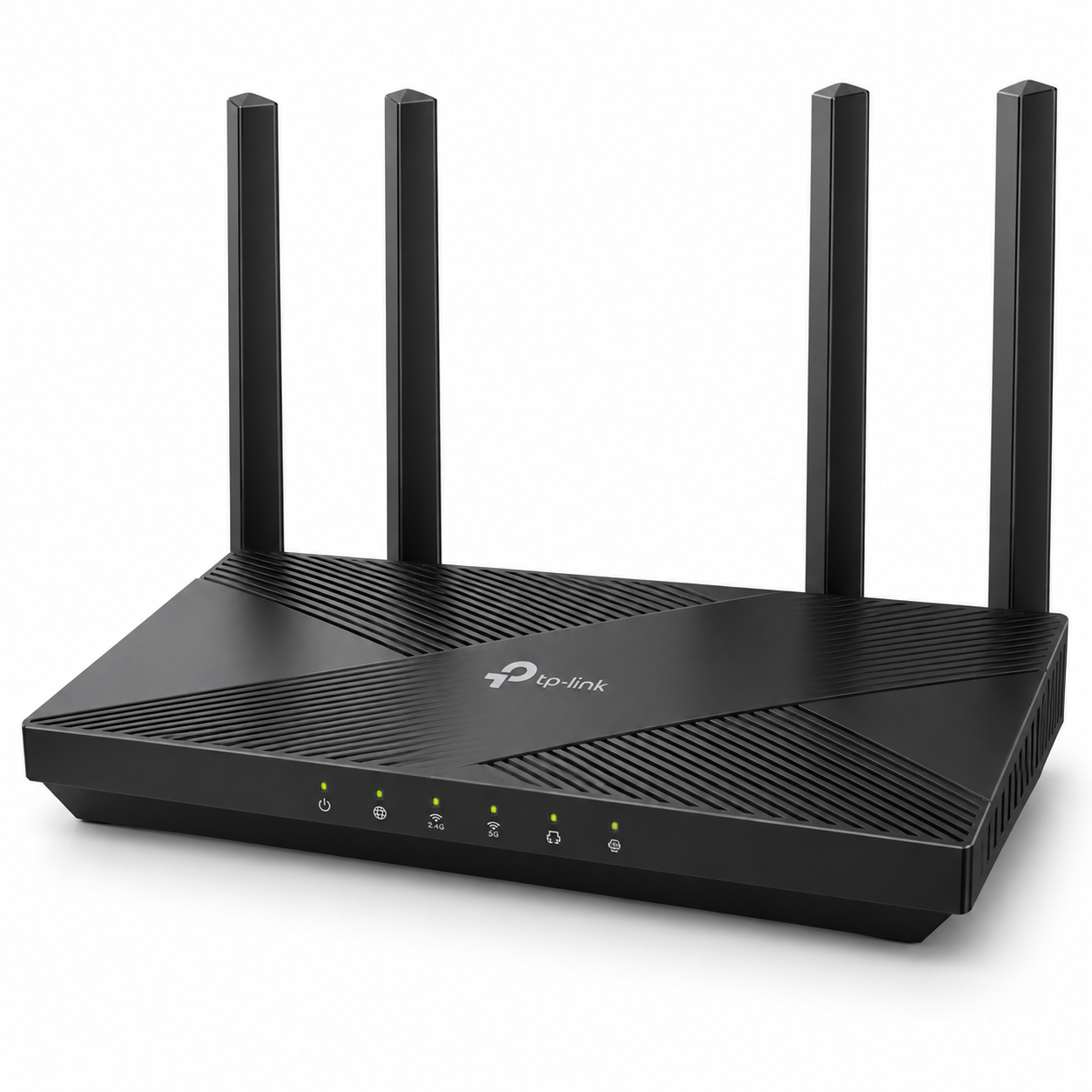
TP-Link Archer C80 AC1900 Wireless MU-MIMO Wi-Fi 5 Router
TP-Link Archer C80 AC1900 Wireless MU-MIMO Wi-Fi 5 Router The TP-Link Archer C80 AC1900 Wireless MU-MIMO Wi-Fi 5 Router is a dual-band Gigabit router designed for homes, home offices and small workplaces that need faster wireless networking, multiple Gigabit Ethernet...
Delivery: Nairobi same-day to 1 day; nationwide 1–5 business days.
Warranty: Manufacturer warranty where applicable.
Description
TP-Link Archer C80 AC1900 Wireless MU-MIMO Wi-Fi 5 Router
The TP-Link Archer C80 AC1900 Wireless MU-MIMO Wi-Fi 5 Router is a dual-band Gigabit router designed for homes, home offices and small workplaces that need faster wireless networking, multiple Gigabit Ethernet connections and better handling of several connected devices.
It provides wireless speeds of up to 1300 Mbps on the 5 GHz band and up to 600 Mbps on the 2.4 GHz band, giving it an AC1900 rating. The Archer C80 also combines 3×3 MU-MIMO, Beamforming, four fixed external antennas, Smart Connect and Airtime Fairness to improve wireless efficiency in busy home networks.
For customers looking to buy TP-Link Archer C80 in Kenya, it is a practical upgrade from basic single-band routers or models limited to Fast Ethernet ports. It also provides four Gigabit LAN ports, one Gigabit WAN port, WPA3 security, guest networking, parental controls, Access Point Mode and management using TP-Link's Tether app.
Key Features of TP-Link Archer C80
-
AC1900 dual-band Wi-Fi 5 router
-
Up to 1300 Mbps on 5 GHz
-
Up to 600 Mbps on 2.4 GHz
-
IEEE 802.11ac/n/a support on 5 GHz
-
IEEE 802.11n/b/g support on 2.4 GHz
-
3×3 MU-MIMO
-
Four fixed high-performance antennas
-
Beamforming technology
-
Smart Connect
-
Airtime Fairness
-
1× Gigabit WAN port
-
4× Gigabit LAN ports
-
1.2 GHz CPU
-
Router Mode
-
Access Point Mode
-
WPA, WPA2 and WPA3 wireless security
-
Separate 2.4 GHz and 5 GHz guest networks
-
SPI firewall
-
IPv4 and IPv6 support
-
OneMesh support
-
Device-based QoS
-
Parental controls
-
IPTV support
-
TP-Link Tether app and web-based management
AC1900 Dual-Band Wi-Fi
The Archer C80 operates on both the 2.4 GHz and 5 GHz bands.
TP-Link rates the router at up to 600 Mbps on 2.4 GHz and 1300 Mbps on 5 GHz. These are theoretical wireless link rates under compatible conditions rather than guaranteed internet speeds.
The 2.4 GHz band is useful for general browsing, smart devices and devices located farther from the router, while the 5 GHz band is better suited to bandwidth-intensive activities such as streaming, large file transfers, video calls and online gaming.
Actual speed depends on factors including your ISP connection, client-device capabilities, wireless interference, walls, distance and router placement.
3×3 MU-MIMO
The TP-Link Archer C80 supports 3×3 MU-MIMO technology.
MU-MIMO allows the router to communicate with multiple compatible wireless devices more efficiently instead of serving every wireless client strictly one at a time.
TP-Link also states that the Archer C80 can transmit and receive data over three spatial streams. Devices that support 3×3 Wi-Fi can make fuller use of this capability than devices limited to 2×2 or 1×1 wireless configurations.
This does not mean every connected device will automatically receive 1900 Mbps. Client-device capabilities still determine the maximum link rate each device can use.
Four Antennas and Beamforming
The Archer C80 uses four fixed high-performance antennas.
It also supports Beamforming technology, which is designed to focus wireless signal toward connected clients instead of distributing radio energy equally in every direction.
TP-Link categorises the Archer C80's Wi-Fi range as suitable for approximately a three-bedroom-house class environment. This should be treated as a general manufacturer coverage category rather than a guaranteed distance or square-metre figure.
Concrete walls, multiple floors, metal structures, neighbouring Wi-Fi networks and router positioning can significantly affect actual wireless coverage.
Smart Connect and Airtime Fairness
Smart Connect allows the router to place compatible devices on an appropriate wireless band automatically.
This can reduce the need to manually decide whether each device should connect to 2.4 GHz or 5 GHz.
Airtime Fairness is designed to stop slower wireless clients from occupying excessive wireless airtime, which can improve overall efficiency when older and newer devices are connected to the same network.
Gigabit Ethernet Ports
The TP-Link Archer C80 includes:
-
1× Gigabit WAN port
-
4× Gigabit LAN ports
The Gigabit WAN port is used to connect the Archer C80 to an upstream modem, ONT or other internet connection.
The four Gigabit LAN ports allow wired connections to desktop computers, Smart TVs, network switches, gaming consoles and other Ethernet devices.
These Gigabit ports are especially useful when upgrading from routers fitted with only 10/100 Mbps Ethernet ports.
Router Mode and Access Point Mode
The Archer C80 supports both Router Mode and Access Point Mode.
In Router Mode, it can operate as the main router between your internet connection and local devices.
In Access Point Mode, the Archer C80 can provide Wi-Fi from an existing wired network while another router or gateway performs the main routing functions.
This makes the device useful both as a primary home router and as part of a larger wired network.
For larger offices, structured cabling projects, multiple-access-point installations and professionally designed business networks, customers can also use OrbitLink Solutions for networking and installation services while sourcing networking hardware through Tawa.
WPA3 and Network Security
The Archer C80 supports:
-
WPA
-
WPA2
-
WPA3
-
WPA/WPA2-Enterprise using 802.1X
WPA3 provides a newer Wi-Fi security standard for compatible wireless clients.
The router also includes:
-
SPI firewall
-
Access control
-
IP and MAC binding
-
Application Layer Gateway functions
Separate guest networks can be created for both the 2.4 GHz and 5 GHz wireless bands.
A guest network is useful when you want visitors to access the internet without giving them the credentials used by your main wireless network.
Parental Controls
TP-Link lists URL filtering and time controls among the Archer C80's parental-control features.
These controls can help manage internet access for selected devices or users within a household.
They can be useful for restricting particular websites or limiting when selected devices are allowed to access the network.
Quality of Service
The Archer C80 supports device-based Quality of Service.
QoS allows selected devices to receive priority when available internet bandwidth is being shared across multiple users.
It is important to understand that QoS does not increase the speed supplied by your ISP. It manages how existing bandwidth is distributed between connected devices.
OneMesh Support
TP-Link officially lists the Archer C80 as supporting OneMesh.
OneMesh allows a compatible TP-Link OneMesh range extender to work with the router as part of a more unified home Wi-Fi network.
This can be useful when one router alone cannot provide sufficient coverage throughout the building.
Because TP-Link sells multiple hardware revisions and regional versions of the Archer C80, customers planning a OneMesh setup should confirm compatibility between the exact router revision, firmware and extender being purchased.
IPTV Support
The Archer C80 supports several IPTV-related functions, including:
-
IGMP Proxy
-
IGMP Snooping
-
Bridge
-
Tag VLAN
These features may be useful where an ISP provides IPTV services that require compatible network configuration.
The exact configuration required will depend on the internet service provider.
WAN Connection Types
TP-Link lists support for the following WAN connection types:
-
Dynamic IP
-
Static IP
-
PPPoE
-
PPTP
-
L2TP
This makes the Archer C80 compatible with many common broadband configurations.
Customers should still confirm the exact connection and authentication requirements used by their ISP.
IPv4 and IPv6
The TP-Link Archer C80 supports both IPv4 and IPv6.
IPv6 support is useful for internet providers and networks that have introduced or are transitioning toward IPv6 addressing.
IPv4 remains supported for conventional network installations.
TP-Link Tether App
The Archer C80 can be configured using TP-Link's Tether app or through its web management interface.
The Tether app allows compatible Android and iOS devices to perform common setup and network-management tasks without needing to configure everything from a desktop browser.
TP-Link also lists cloud-related features including TP-Link ID and OTA firmware upgrades.
Best Uses for TP-Link Archer C80
The Archer C80 is suitable for:
-
Home internet connections
-
Home offices
-
Small offices
-
Dual-band Wi-Fi upgrades
-
Video streaming
-
Online gaming
-
Video conferencing
-
Smart TVs
-
Desktop computers
-
Smartphones and tablets
-
Gigabit wired networking
-
Access Point Mode deployments
-
Compatible OneMesh Wi-Fi extensions
It is primarily a home and small-office router.
Businesses requiring advanced multi-WAN routing, large VLAN deployments, sophisticated firewall policies or centrally managed enterprise wireless networks may require more specialised equipment.
Who Should Buy the TP-Link Archer C80?
The Archer C80 makes sense for customers who want a Wi-Fi 5 router with Gigabit Ethernet and better wireless features than basic entry-level routers.
It is particularly relevant for users upgrading from a 2.4 GHz-only router or from an older dual-band router limited to 100 Mbps Ethernet ports.
Customers specifically looking for the newer Wi-Fi 6 or Wi-Fi 7 standards should note that the Archer C80 is a Wi-Fi 5 router.
TP-Link Archer C80 AC1900 Wireless MU-MIMO Wi-Fi 5 Router Price in Kenya
The TP-Link Archer C80 price in Kenya can change depending on stock availability, exchange rates, shipment costs and supplier pricing.
The exact hardware revision available in Kenya may also vary.
For this reason, customers should check Tawa for the current TP-Link Archer C80 price and availability rather than relying on an older fixed price.
When comparing quotations, confirm that the product being supplied is genuinely the TP-Link Archer C80 AC1900 and check the hardware revision shown on the unit or packaging.
What to Check Before Buying
Before ordering the TP-Link Archer C80, confirm:
-
Exact model: Archer C80
-
Hardware revision
-
Current firmware compatibility
-
ISP compatibility
-
Whether you require Router Mode or Access Point Mode
-
Whether your devices support 5 GHz Wi-Fi
-
OneMesh compatibility if using an extender
-
Current package contents
-
Current warranty terms
-
Current stock availability
-
Current selling price
TP-Link states that model and hardware-version availability can vary between regions. Firmware should therefore always be selected for the correct regional and hardware version.
Buy TP-Link Archer C80 AC1900 Wireless MU-MIMO Wi-Fi 5 Router in Kenya
The TP-Link Archer C80 AC1900 Wireless MU-MIMO Wi-Fi 5 Router combines dual-band Wi-Fi 5, 3×3 MU-MIMO, Beamforming, four external antennas and full Gigabit Ethernet connectivity in a router aimed primarily at homes and small offices.
It is particularly useful for buyers who need four Gigabit LAN ports, dual-band wireless connectivity, guest networking, parental controls, WPA3, Access Point Mode and OneMesh compatibility without moving to a more advanced enterprise router.
Before ordering, confirm the hardware revision, stock availability, package contents, warranty terms and current selling price. To buy TP-Link Archer C80 in Kenya, check the latest availability and pricing directly from Tawa.